
Open source · Free · No ads

Global Speed extension — web video speed control from 0.25x to 16x

Rewind lectures, fast‑forward trailers, and pitch‑shift podcasts on any page that uses an HTML5 player. Works on YouTube, Netflix, Spotify, Bilibili, Coursera, most cloud‑drive previews, and a long tail of news and learning sites. Open source, MIT licensed, no telemetry.

MIT licensed Chrome · Edge · Firefox 0.25x – 16x Volume up to 600%
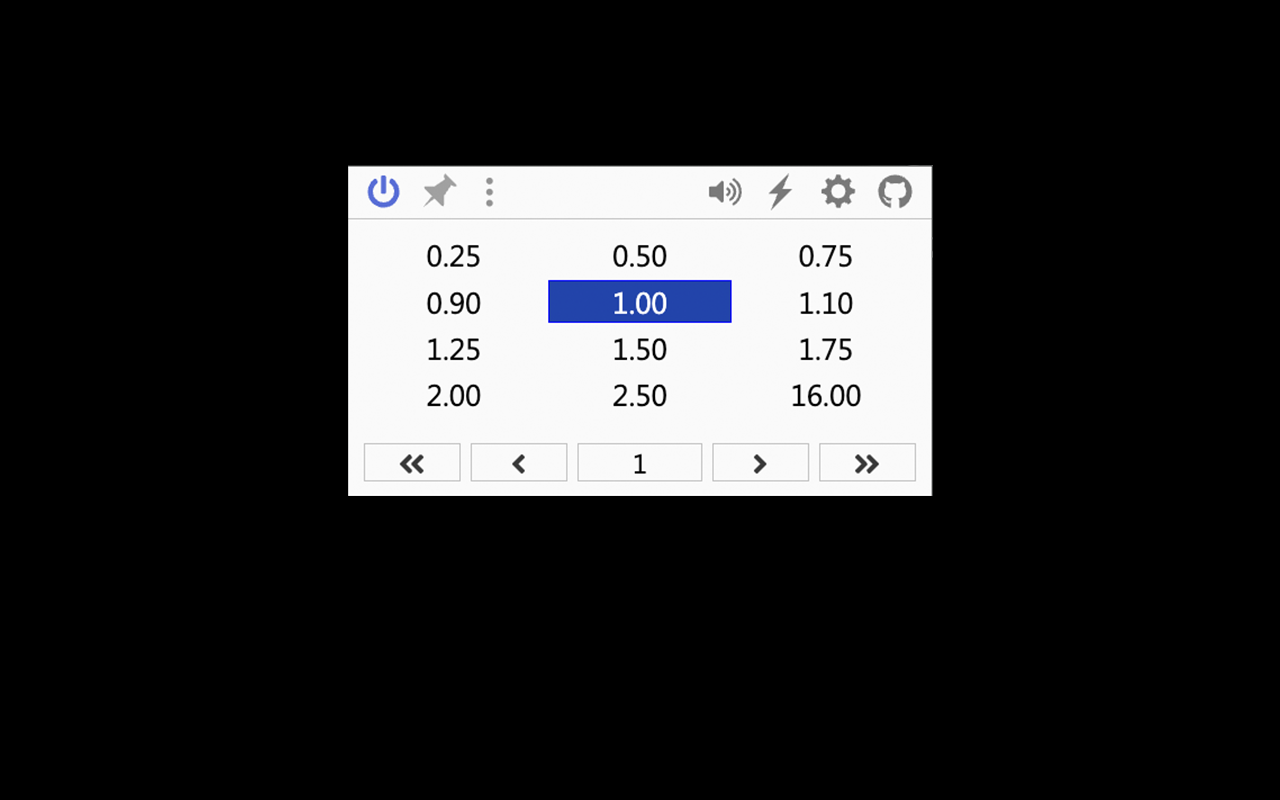
Global Speed popup showing speed buttons 0.25 to 16 and toolbar icons

Speed panel — one‑click selection from 0.25x to 16x

  • 0.25‑16x
    Speed range
  • 600%
    Volume ceiling
  • 3
    First‑class browsers
  • MIT
    License
Features

Three jobs, done well

No bloat, no side‑quests. The extension focuses on speed, hotkeys, and audio/video tweaks, and lets you script every one of them with URL rules and keyboard bindings.

Speed control

Pick a speed once and forget about it. Every HTML5 video and audio on every page picks it up.

  • Presets at 0.25 / 0.5 / 0.75 / 0.9 / 1.0 / 1.1 / 1.25 / 1.5 / 1.75 / 2.0 / 2.5 / 3.0 / 16.0
  • URL rules: auto‑apply 2.0x on Bilibili, 1.5x on YouTube, 1.25x on lecture sites
  • Whitelist and blacklist domains, with per‑site overrides
Media hotkeys

Bind every action to a key. Faster, slower, frame back, frame forward, rewind, fast‑forward, volume up, volume down, mute, power toggle — all configurable.

  • Global hotkeys keep working when you switch to PowerPoint or a PDF
  • Picture‑in‑picture mode is supported
  • Right‑click menu and floating circle widget as alternatives

Filters and audio effects

Brighten a dark Netflix title, boost a quiet interview, or pitch‑shift a podcast. All built into the same popup — no second extension needed.

  • Brightness, contrast, and saturation sliders
  • Volume up to 600%, works on encrypted audio streams
  • Pitch shift on Chromium browsers
UI preview

The two entries you will actually use

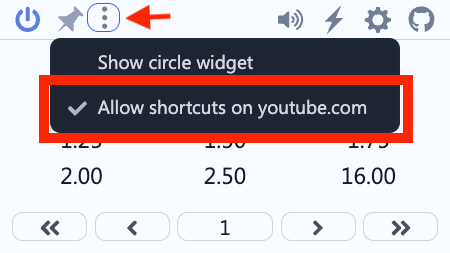
The speed panel is for picking a rate. The three‑dot menu is for everything else: showing the circle widget, granting hotkey access to a domain, and switching strategy modes.

Global Speed popup showing speed buttons from 0.25 to 16.00 and toolbar icons
Speed panel — 0.25x to 16x plus volume, filters, settings, and GitHub link
Global Speed popup showing the three‑dot menu with options to show the circle widget and allow shortcuts on youtube.com
First‑visit prompt — “Allow shortcuts on youtube.com”
Install

Four ways, pick one

If you can reach the Chrome, Edge, or Firefox store, a one‑click install is the cleanest path. If your network cannot, grab the build from GitHub Releases and load it unpacked.

  1. 1

    Grab a build

    From the Chrome Web Store, the Edge add‑ons site, Firefox AMO, or the GitHub Releases zip.

  2. 2

    Unzip if needed

    For the GitHub zip, extract with 7‑Zip, WinRAR, or unzip to a stable folder.

  3. 3

    Open the extensions page

    Go to chrome://extensions (Edge: edge://extensions), enable Developer mode.

  4. 4

    Load unpacked

    Click “Load unpacked”, pick the folder containing manifest.json. The toolbar icon shows up immediately.

Note: Chrome no longer supports double‑clicking a .crx file to install. If you downloaded from a mirror that ships a single .crx, rename it to .zip and extract it first, then load the folder unpacked. Do not delete the source folder afterwards.
Compatibility

Where it works

The extension talks to the native HTML5 <video> and <audio> elements. Any page that uses them is fair game. The list below is a sample, not a contract.

Browsers

Chrome 88+ Microsoft Edge 88+ Firefox 78+ Brave Vivaldi Opera Kiwi Browser (Android) iOS Safari (no extension support)

Sample supported sites

YouTube Netflix Spotify Web Bilibili Vimeo Twitch Apple Podcasts (web) Coursera edX Khan Academy Google Drive video preview Baidu Netdisk preview Aliyun Drive preview Pocket Casts web Major news sites
Download

Get the build

The recommended route is the official browser store. The Baidu Netdisk mirror below is provided for visitors in mainland China who need a faster link. The package on Baidu Netdisk is the same build as the GitHub Release.

Baidu Netdisk mirror (China)

Faster download for users in mainland China. Extraction code r9ne.

https://pan.baidu.com/s/1c6tg3Cf4zj3-G1OBKdp62w?pwd=r9ne
Open on Baidu Netdisk
Mirror: Baidu Netdisk
Extraction code: r9ne
Source of truth: GitHub Releases
Last updated: 2026-08-28
FAQ

Things people ask before and after installing

Ordered roughly by the user journey: what it is, how to install, how to fix common issues. If something is missing here, the GitHub issue tracker is the next stop.

What is Global Speed?

Global Speed is an open‑source browser extension that rewinds, fast‑forwards, and pitch‑shifts any HTML5 video or audio on a web page. It supports 0.25x to 16x, boosts volume up to 600%, and exposes URL rules, custom hotkeys, and basic image filters. Source code lives on GitHub under polywock.

Compared to Video Speed Controller and similar tools, the main additions are URL rules, global hotkeys, and the audio/visual panel.

Is it free? Does it track me?

Yes, it is free. No ads, no analytics, no bundled SDKs. The extension is MIT licensed and fully auditable on GitHub.

The only network request the extension makes is an optional version check, which you can disable in settings. There is no telemetry, no browsing history collection, and no account.

Which browsers are supported?

Officially: Chrome 88+, Microsoft Edge 88+, Firefox 78+. Any Chromium‑based browser (Brave, Vivaldi, Opera, Edge Canary, Kiwi on Android) can load the unpacked build.

iOS Safari does not support third‑party extensions. On Android, browsers like Kiwi and Yandex support unpacked extensions, although global hotkeys may be limited.

Does it work on Netflix, YouTube, Spotify, and cloud drives?

It works on every page that uses the native HTML5 video/audio element. Confirmed examples include YouTube, Netflix, Spotify Web, Bilibili, Vimeo, Twitch, Coursera, edX, Khan Academy, Apple Podcasts (web), Pocket Casts (web), Google Drive previews, Baidu Netdisk previews, and Aliyun Drive previews.

DRM‑protected streams (some Netflix titles, some encrypted cloud‑drive lectures) and cross‑origin embed iframes cannot be controlled — those sites override playbackRate for security reasons.

Why does the speed slider not appear on a specific video?

Common reasons: 1) the page uses a non‑H5 player (Flash, a custom MSE/EME handler, or a cross‑origin iframe); 2) the site ships its own speed control and blocks playbackRate overrides; 3) the extension is paused on that domain — open the popup and remove the site from the blacklist; 4) you have to grant the site permission via the page prompt the first time, then reload.

Switching the strategy dropdown in the popup to “Generic” also helps on some sites.

Why can I not find Global Speed in the Chrome Web Store?

It is in the store under the id jpbjcnkcffbooppibceonlgknpkniiff. Direct link: chrome web store. If you cannot reach the store from your region, the GitHub Releases page ships the same build as a zip you can load unpacked.

How loud can the volume go?

Up to 600% of the original volume, controlled from the speaker icon in the popup. The boost is applied via the Web Audio API, so it also works on encrypted audio streams like Spotify Web.

Can I rebind the hotkeys? What can they do?

Yes. Open the popup, click the gear icon, then Hotkeys. You can rebind every action: faster, slower, reset to 1.0x, frame back, frame forward, rewind, fast‑forward, volume up/down, mute, toggle power.

Enabling “Allow global shortcuts” lets you keep controlling a background video or a PiP window while using another app such as PowerPoint or a PDF reader.

Does it affect my account, membership, or watermarks?

No. The extension only writes to the playbackRate, volume, brightness, and contrast properties of the local media element. It does not modify the page DOM, does not call the site backend, and does not touch cookies. Logins, paid membership, and watermarks are left alone.

Will updates wipe my settings?

No. Settings live in chrome.storage / browser.storage. Store installs update automatically. Manual installs need you to drop a new build over the old folder. URL rules, hotkeys, and saved speeds all carry over.

How is it different from Video Speed Controller?

VSC focuses on the manual hotkey workflow. Global Speed adds URL rules (auto‑apply a speed to specific sites), global hotkeys, a volume panel, brightness and contrast filters, and pitch shift. If you only need a slider plus a couple of keys, VSC is plenty. If you want a single extension that covers speed, audio, and visual tweaks, Global Speed is the more complete option.

Is this an official site?

No. globa.club is an unofficial reference site maintained for download convenience and documentation. The only authoritative sources for releases are the GitHub repository and the official browser extension stores (Chrome, Edge, Firefox). Use this site for documentation and convenience; rely on GitHub for the source of truth.